FTP Navigator Description
The program lets you upload and download data or delete one or more files, including whole folders along with subdirectories.
It can also automatically resume and complete file transfers, which for some reason, have been interrupted, or periodically attempt to connect with the FTP server if the pervious link was unsuccessful.FTP Navigator is a FTP client that allows you to transfer files.
The superb options of FTP Navigator program include: directory synchronization on local and remote access computers (for comparing modified or new files), a full range of keys and options to monitor command line control, manual input of FTP commands, etc.
The program includes a command that allows you to "keep connection," which means that retention prompts are periodically generated to maintain the connection.
The program is compatible with Proxy, Firewall, Sockets 4, 4.5 and 5. It also contains a passive file transfer mode.
FTP Navigator Screenshot

Download It Now
Site Publisher Description
Running your own website and making money on the Net is not easy, contrary to what you may read or hear.
In order to create successful website that attracts visitors, you need to be able to provide relevant content and quickly and frequently update your site. Unfortunately, the technical part of doing this is often difficult and time consuming.
Unless you have our Site Publisher - relatively new product that has already become the industry standard. The reason for such success is its simplicity and user-friendliness.
Site Publisher is a very straightforward product - it synchronizes the local off-line files with your remote web server with a single mouse click. You then can do any alterations or updates to your site off-line.
Site Publisher will automatically detect which files are new or changed and will update only those. Of course, it can also automatically delete files that are no longer needed.
Importantly, File Preview option will allow to see the changes between local and remote copies before actual files uploading and Safe Transfers feature will allow users to access all files even during the upload. It means you won't have broken files/links on your website.
Professional webmasters will also appreciate the following features - multiple site management, resume upload/download mode (in case you got disconnected), autoswitching between ASCII/BINARY modes, Ignoring List option that allows you to leave out certain files or folders from the synchronization process, and multi-session transfers.
And amateur webmasters will appreciate Site Publisher because it will let them to professionally create and manage websites without having to learn for years. So what are you waiting for? Get Site Publisher now.
What's New in This Release:
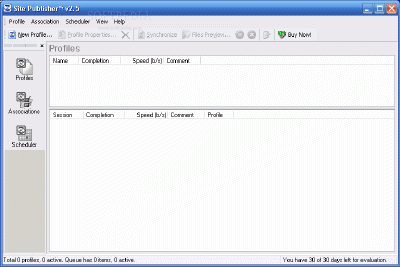
· Fixed problem with parsing dir items with consecutive spaces in name. The user specified value for TimeBias is now applies correctly. Site Publisher Screenshot
Download It Now
| 


